
Load Testing the Blog
Four Raspberry Pis, k3s and .NET 10: from 40 to 160 requests a second
I built my cluster because I wanted to learn more about Kubernetes and networking. Until now I have run a few services for the household, but almost no custom software. I had been planning a blog for ages, wanting to deploy my own software from the ground up, while running the whole stack myself. Network, OS, Software.
What had been distracting me, is that home labs and networks are HUGE rabbit holes for people like me.
Thankfully, AI has made it so much easier to both architect software without writing it yourself as well as figure out what the hell is wrong with your network and infrastructure. So I finally got a blog written, deployed, then did some load testing.
The hardware itself is pretty modest: 5x Raspi 4B one of which has 4GB RAM and the other 4 have 8GB RAM. And one of the 8GB nodes is currently down. All have NVMe drives attached via USB adapters.
I'm aware that in practice, I will never need to serve a lot of readers. This is about learning, trying to make sure the Blogging engine works reasonably efficiently.
Day One: Deployment
Premature optimization is the root of all evil
Donald Knuth, 1974
I must admit, I do like optimising things. But Knuth was right when he vaguely implied that focusing on performance too early is bad, so I waited. Made the first deployment, got an "I'm here" post up.
Day Two: First Tests, OS and Cluster Changes
When you can measure what you are speaking about, and express it in numbers, you know something about it.
Lord Kelvin, 1883
I added VictoriaMetrics, made the second deployment, then started load testing.
The test:
- 5 req/s scaling up to 160 req/s
- Stop if the P95 goes beyond 5 seconds
I was a tad disappointed when the automated test never scaled, because after 100 seconds, the P95 was at 5.08s.
But I'm a software guy with a Bachelor's in Physics. I like data. Being surprised just means I have something to learn.
- Let the pods warm up, numpty!
- My software can't be that bad, so what is wrong?
I could spend days and days, like we all used to, trying without specific domain knowledge to figure out what could be wrong. Screw that, ask Claude.
Your network is losing DNS queries
Claude Code
OK, that's not something I was expecting. Let's get digging on that
- IPV6 is configured incorrectly, some DNS queries were being sent over that
- every DNS search is multiplying the load
- Hardware seems fine, but VXLAN is losing packets
OK then. Fix IPV6, add a kubelet resolver file, switch off flow control on the cluster switch, add a NodeLocal DNSCache on every node.
And by the way, your metrics are making the cluster load explode.
Claude Code
Right, then the metrics can't share a node with... the primary database, or the API pod, or the web pod, or the Traefik instance. Hang on! I only have four nodes up right now.
Disable VictoriaMetrics for now. I have a fifth node, I just need to bring it online later.
And by the way, your OS has no memory reserved for itself
Claude Code
Kubelet memory reservations, eviction thresholds, zram swap.
And after all that?

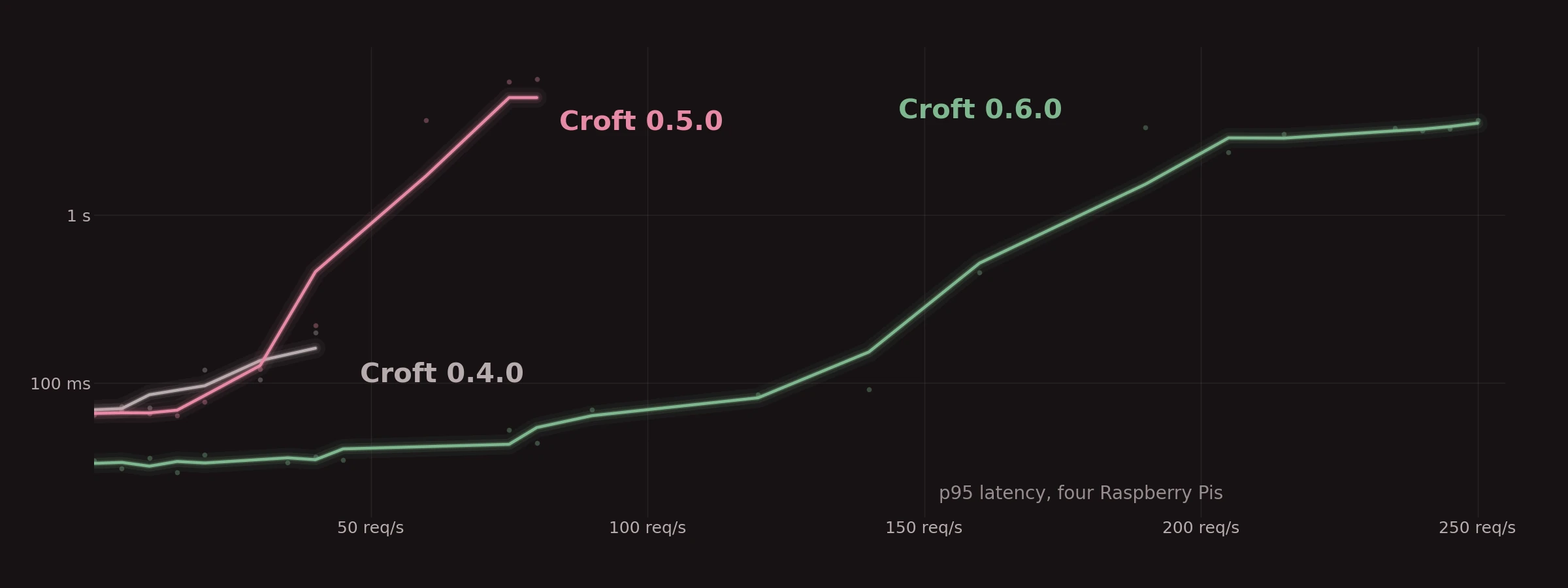
40 req/s. I mean, a major improvement... but hardly stellar.
Day Three: Engine Bottlenecks
Less is more
Robert Browning, 1855
At 40 req/s, the API was using a whole core. I need to figure out what it doesn't need to do:
- How many queries are being performed per page?
- How many times is a page being rendered per request.
- What can I cache?
- Can I add indexes?
- Can I optimise the Request pool settings?
Too many queries per page, rendering twice per request, no caching, no indexes, too many requests in flight. No problem.

57 req/s. But I'm disappointed, that's hardly a big gain. The problem now, is the node with the database primary is at 99% CPU.
Day Four: Infrastructure Bottlenecks
Bottlenecks occur in surprising places
Rob Pike, 1989
- Pod Placement: affinity, anti affinity, soft and hard rules.
- Connection pool settings.

~115-120 req/s. Better, much better.
But the simple req/s load test with Playwright isn't really serving me well any more. Blazor clients hold circuits: a websocket and almost 1MB of server memory.
- A reload test (custom SignalR client hammering reloads).
- OOM-Killed Web pod at 512MB RAM.
- Fix: up pod RAM limit to 1GiB, switch to Workstation GC
But does a reader really need a circuit? Why? I like Blazor for its component model, and the Admin/Editor getting a circuit makes total sense. But A reader? Do I need to update the content while they read a post? Do I need to update the home page while they hang around there? Really?
- A Spike test for making the pages static HTML, all of the JavaScript served by a small module.
- 15 of 15 tests green.
Day Five: Final tuning
Yet we should not pass up our opportunities in that critical 3%
Donald Knuth, 1974
- I have two DB replicas, plus a primary, but everyone reads from the primary?
- Get rid of MudBlazor on post reads.
- The page is about half the size and the CSP can be stricter.
Load test. ~120 req/s. P95 at 412ms, better, but the database was no longer the limit. One node saturated while others idled.
- Tried an Autoscaler.
- Regretted it (cold start under pressure! Eeegh!)
- Tried making cells
- DB instance, API pod, web pod, all on the same node.
- The affinity/anti affinity is all wrong now due to the cells
- Re-optimise.
Load test.

~160 req/s comfortably (p95 270 ms, zero errors). At ~240 req/s all three serving nodes were at 95-98% CPU. With the cells, 110-120 req/s P95 dropped to 80ms.
I'm pretty happy with that. I'm sure it can be better, but it's really quite good.
Still to come
- Ready to Run
- Output Caching
- The web pod still re-renders identical pages for every reader (~14 ms of CPU per page). Caching them should take the ceiling much higher.
- A stricter CSP: default-src 'none', signed scripts. I already get A+ from MDN HTTP Observatory, but there are still pesky red crosses I can fix.
- The fifth node. Proper monitoring is still part of my ideal set-up.